

Moving to a new web host used to mean hours of downloading files, exporting databases, reconfiguring email accounts, and crossing your fingers that nothing broke along the way. For most people, it was enough of a headache to stay put — even if they weren’t happy with their current provider.
We don’t think it should be that way.
That’s why we’ve built a free, fully automated website transfer tool directly into your client area. No support tickets. No waiting around. No technical knowledge required. Just log in, enter your old hosting details, and we’ll handle the rest.
What’s in This Post
- How It Works
- Watch It Happen in Real Time
- Preview Before You Switch
- What Gets Migrated
- Built for Peace of Mind
- No Cost, No Catch
- Ready to Make the Switch?
How It Works
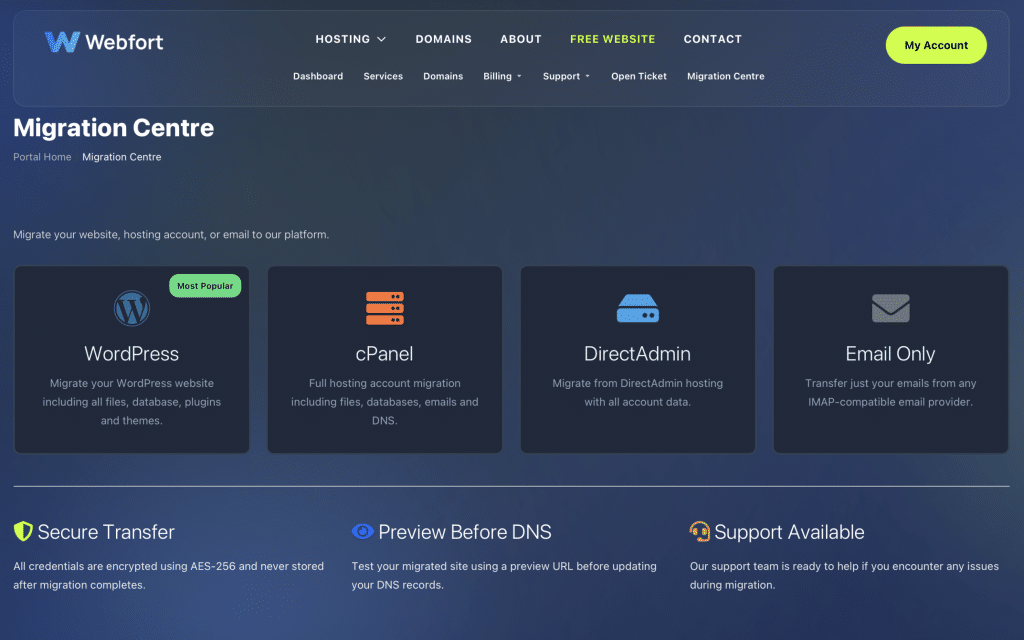
From your client area, you’ll see a simple screen with four migration options:
- WordPress — Migrate your entire WordPress site: files, database, plugins, themes — everything.
- cPanel — Transfer your full cPanel hosting account including files, databases, email accounts, DNS records, and cron jobs.
- DirectAdmin — Moving from a DirectAdmin server? We support that too.
- Email Only — Just need to bring your emails across? Transfer from any IMAP-compatible provider.
Pick your migration type, enter your current hosting credentials, and click go. That’s it.
Watch It Happen in Real Time
Once your transfer starts, you’ll see a live progress page showing exactly what’s happening at every step — from backing up your old account to restoring it on our servers.
There’s no guesswork and no need to keep refreshing. You can even close the page and come back later; we’ll send you an email when it’s done.
Preview Before You Switch
Here’s the part we’re most proud of: after your site has been migrated, we give you a preview link so you can check everything looks right on our servers — before you update a single DNS record.
Browse your site, test your forms, check your emails. If something doesn’t look right, you’ll know before any of your visitors do.
Tip: We also provide hosts file instructions if you want to test with your actual domain name before switching DNS.
What Gets Migrated
When you run a full cPanel or DirectAdmin transfer, we move everything:
- All website files and directories
- MySQL databases
- Email accounts and their contents
- DNS zone records
- Cron jobs
- SSL certificates
- Addon domains and subdomains
For WordPress migrations, we transfer your complete installation including the database, plugins, themes, and uploads.
Built for Peace of Mind
We know your website is important to you, so we built this tool with reliability as the top priority:
- Automatic backups of your source account before any changes are made
- Encrypted transfers — your credentials and data are protected throughout
- Detailed activity logs so you can see exactly what happened during migration
- Smart error handling — if something goes wrong, you’ll know exactly what and why
No Cost, No Catch
This isn’t a paid add-on or a premium feature. Every hosting customer gets access to the transfer tool at no extra charge.
Whether you’re moving a single WordPress blog or a full cPanel account with dozens of email addresses, it’s completely free.
Ready to Make the Switch?
If you’ve been thinking about moving your website to us but dreading the migration process, that excuse is officially gone.
Log in to your client area, click Migration Centre, and let us do the heavy lifting. Your new hosting is just a few clicks away.
[…] Yes, most UK hosting providers offer free website migration. The process typically involves copying your files and database to the new server and updating your domain’s DNS records. Many providers, including Webfort, handle the entire transfer for you at no extra cost. Read more about how easy it is to switch hosting providers. […]